Asset tags and QR labels
Generate QR labels in batches, print ready-to-apply stickers, and link each code permanently to an asset for self-service maintenance or public feedback.
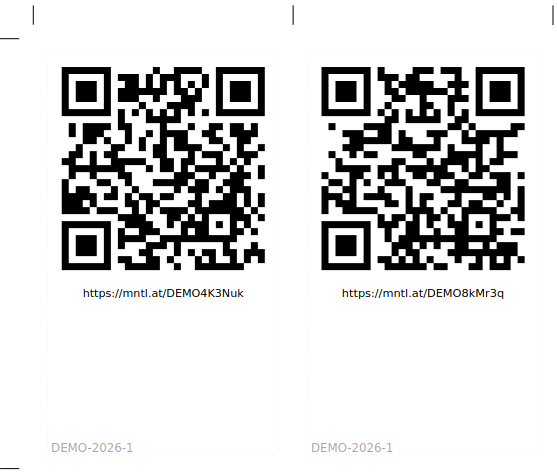
You can now label physical assets with QR codes that open Maintella without a pre-assigned task or email thread.
What’s new
- Batch generation of asset access codes before you go to site
- Print-ready PDF export for label sheets (QR, URL, and batch reference on each sticker)
- Claim on asset by scanning an unclaimed code or from the admin console
- Permanent access until you invalidate a code—unlike task Magic Links, which expire with the visit
Each code resolves to a short URL on your organization’s QR domain (for example mntl.at/…). After claim, scanning opens the asset in Maintella.
Who it’s for
Operations and admins roll out stickers across chargers, panels, or equipment, export labels, and manage batches from Asset Access URLs in the admin app.
Field technicians scan a tag on site and start published self-startable workflows—inspections, filter swaps, visual checks—without waiting for dispatch to assign a task.
Site visitors and customers can scan a tag wired to a user workflow (for example “Report an issue” or “Send feedback”) and submit anonymously; responses appear on the asset Feedback tab.
How it fits with Magic Links
| Magic Link (assigned task) | Asset tag (QR label) | |
|---|---|---|
| Typical use | Remote team sends work to a named visit | Permanent entry point on the asset |
| Lifetime | Bound to the task; expires | Permanent until invalidated |
| Delivery | Email, SMS, contractor FSM | Physical sticker |
Many networks use both: dispatch still assigns urgent work by link; every asset also carries a tag for routine self-service and public feedback.
Getting started
- Sign in at app.maintella.com/admin.
- Open Admin → Asset Access URLs and generate a batch.
- Download the batch PDF, apply labels, and claim each code to the correct asset on site.
See Three ways to reach the asset on our website—including live demo scans—or contact hello@maintella.com for rollout help.